Add User Wizard Step 5
Navigation: User Setup & Registration > Add User Wizard:
Add User Wizard Step 5
Use the Next Button on Step 4 or the Back Button on Step 6
This screen lets you set up producers. A producer is the licensed professional who brings business products into the business. We chose the word "Producer" to be generic and it is used to mean any advisor, agent, or representative.
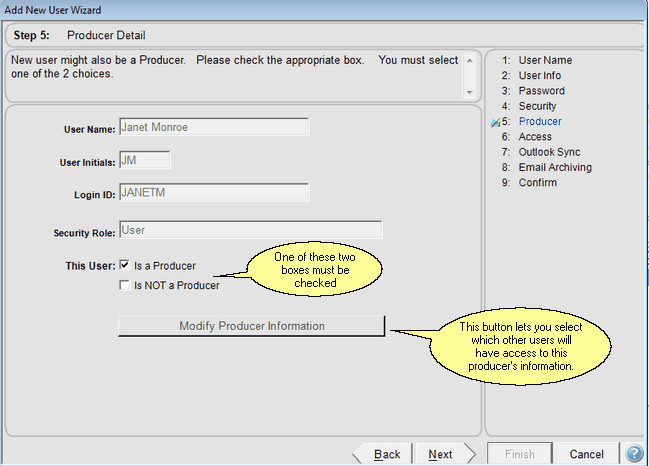
Determine if the User is also a Producer
This User Is a Producer
When the user is a producer, you'll be able to designate which staff members have access to the producer's contacts (If you are setting up a Multi-producer or Enterprise system. Set up the producers first so it will be easier when you set up non-producers.
This User Is NOT a Producer
Check this box when the user is not a producer.
See Also
Add User Wizard Step 9 Confirm All
Add User Wizard Step 8 Email Archive Preferences
Add User Wizard Step 7 Calendar And Email Sycn
Add User Wizard Step 6 Producer Access
Add User Wizard Step 4 Security Roles And Access Rights
Add User Wizard Step 3 User Password
Add User Wizard Step 2 User Login
Add User Wizard Step 1 User Name To Set Up
|
|
If you are not using an Enterprise or Multi-producer system, all users on the system have access to all contacts and their products. If you are using a Multi-Producer or Enterprise system, you must set up at least one producer first. It's a good idea to set up your producers before non-producer users. That will make it easier to give users access to the producer's contacts later in this wizard. |
