Add User Wizard Step 8
Navigation: User Setup & Registration > Add User Wizard:
Add User Wizard Step 8
Click the Next Button from Step 7
The final setup item for a user is to set the email archiving preferences for either Outlook or OWA / Exchange Server as it was selected in the previous step.
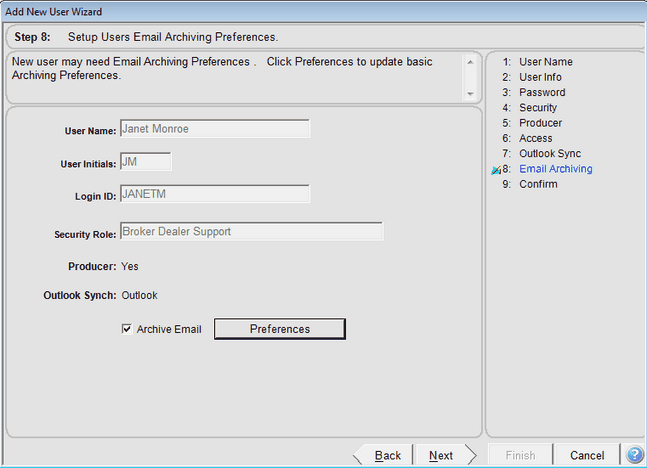
Archive Email Check Box
If you want to archive email for this user, check the box and you will automatically be taken to the User Email Preferences Screen.
Preferences Button
This button allows you to go back and revisit the Email Preferences Screen so you can make changes without having to leave the wizard.
See Also
Add User Wizard Step 9 Confirm All
Add User Wizard Step 7 Calendar And Email Sycn
Add User Wizard Step 6 Producer Access
Add User Wizard Step 5 Producer Information
Add User Wizard Step 4 Security Roles And Access Rights
Add User Wizard Step 3 User Password
Add User Wizard Step 2 User Login
Add User Wizard Step 1 User Name To Set Up