View A File In AdvisorVault
- Navigation: Client Facing Portal - AdvisorVault > Using AdvisorVault With Advisors Assistant:
View A File In AdvisorVault
From Any View Client Screen, click on the Files Tab. Then click on the AdvisorVault Perspective.
Overview
Files stored in AdvisorVault are easy to view because they are listed with your client in the View Client With Files, AdvisorVault Perspective.
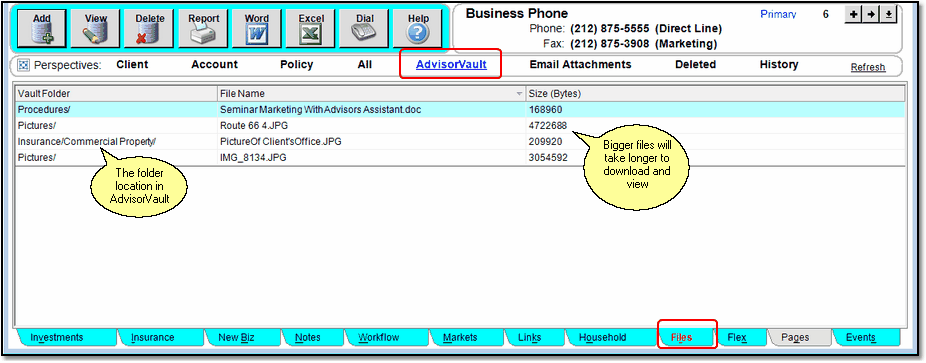
Just click on the file you want to view!
Viewing a file is as easy as double clicking on the file or right clicking and choosing the View Option. The only other requirement is that you are on the AdvisorVault Perspective so that Advisors Assistant will know that you want to view a file in AdvisorVault
See Also
Single Sign On To Your Advisor Vault
Bursting Reports Into Individual PDF Files
Using AdvisorVault From Inside Advisors Assistant
Creating Individual Client Vaults From Inside Advisors Assistant
Using Selection Reports To Create Multiple Client Vaults At The Same Time
Uploading Burst PDF Reports To Clients' Vaults
Viewing Files Stored In AdvisorVault From Inside Advisors Assistant
Keeping Advisors Assistant and AdvisorVault Synchronized
|
|
When you view a file in AdvisorVault it is logged in the file history for that client. |
